---
title: "Enterprise search essentials"
author: "PebbleRoad"
url: "https://books.pebbleroad.com/3/enterprise-search-essentials"
---

# About PebbleRoad

[PebbleRoad](https://www.pebbleroad.com/) is a Singapore-based innovation and design consultancy. We envision a world where digital business transformation is not just a buzzword but a catalyst for meaningful, sustainable growth. We aim to deliver this outcome by empowering our clients with the experience and expertise to achieve strategic clarity, build innovative digital products, and grow capabilities. 

Enterprise search is surging again in the age of GenAI. The lure of natural language queries and replies is driving many to throw their content into large language models (LLMs) only to be disappointed with the results. Knowing what goes into a good search experience is still relevant and essential. We hope this guide will offer critical pointers that can help improve the search experience for your staff.

Happy reading!


# Introduction

This book is for those experimenting with enterprise search. If you believe that a good search experience has value and find yourself working hard to make this vision a reality, this book is for you. 

The book is written with an eye on the future. The amount of data and content in organisations is exploding, and there is an urgent need to tame, organise, and gain insights from it. These are the challenges that the enterprise search is positioned to solve. And the timing could not be better. Search technologies are maturing and converging (think GenAI), offering vast opportunities to design unique search experiences. Welcome to the future, you lucky search person!

Part 1: Search thinking

# Search fundamentals
As a search person, you must be clear on fundamental search concepts. Don’t be fooled into thinking that because you use Google daily, you know all there is to know about search.

## What is search?
Search is finding and using information to get a job done. For example, searching for the travel claims policy before travelling to know which expenses are reimbursable and which are not. **The success of the ‘job’ is not to get a document on travel policy but to use the information gained to make well-informed decisions.**

The word ‘information’ here means the interpretation or understanding the user gets after the search experience. The ‘content’ is what the user goes through to get information. Content is what is provided (e.g., document or webpage); information is what the user understands.

  ![content-information.png](https://books.pebbleroad.com/u/content-information-plFE5c.png) 

## Why search?
Organisations have become voracious creators and consumers of content, and the volume and velocity will only increase.

The information overload has led to anxiety caused by:
- Not finding existing information
- Taking too long to find the correct information
- Being unable to discover related information
- Not finding the right people with the right expertise
- For newcomers struggling to learn a ‘messy’ environment

In this age of apps and chatbots, people are used to a search-first mindset inspired by a Google-type simplicity (or <a href="https://www.perplexity.ai/" target="blank">Perplexity</a>-type chatty) use of search. However, when the same people go to work, they find a very different world.

<a href="https://ir.coveo.com/en/news-events/press-releases/detail/334/coveo-research-finds-a-growing-generational-gap-that-could" target="blank">A 2023 report by Coveo</a> found that employees now spend approximately 3 hours each workday searching for information, a decrease from 4 hours last year. This report also noted that nearly 89% of employees search multiple data sources, which can further increase the time spent looking for necessary information​.

<a href="https://www.hcamag.com/us/specialization/employee-engagement/employees-waste-at-least-two-hours-a-day-searching-for-what-they-need-to-work/324737" target="blank">Another study by Glean</a> revealed that employees waste at least 2 hours each day searching for the documents, information, or people they need to complete their tasks. This inefficiency is particularly frustrating for workers, with many considering leaving their jobs due to difficulty accessing necessary resources​.

## Why not just use Google?
The search experience Google offers millions of users is great but general. You, however, may want to offer your customers or staff great and specific search experiences. For example, if you are a bank, Google may link to the credit card page on your website, but your site search experience could include relevant details and even offer a call to action.

 ![search-rich-snippet.png](https://books.pebbleroad.com/u/search-rich-snippet-NGoRui.png) 

The challenge is educating project owners and sponsors that specific search experiences are better than general ones. In the world of business, context matters. 

This book contains many context-rich examples that you can use to argue for specific search experiences.

## What is enterprise search?
Enterprise search refers to a wide range of technologies you can subscribe to or buy to help design great search experiences.

Wikipedia [defines enterprise search ](https://en.wikipedia.org/wiki/Enterprise_search)as “the practice of making content from multiple enterprise-type sources, such as databases and intranets, searchable to a defined audience.” This definition focuses more on ‘enterprise’ than on ‘search’. Yes, organisations are messy, content is all over the place, and there is a need to make all the content searchable. But the end game should still be the search experience.

The systems in the enterprise search stack depend on what you want to achieve. If you have a small collection of web pages, then you may only need a good search engine. However, you may need to add taxonomy management and content analytics systems if you have millions of office documents.


Part 2: Search experience

# What is a search experience?
User experience, customer experience, search experience—we hear these terms every day. But really, what is this experience thing?

An experience is what a person goes through and remembers.

Let's unpack this definition.

When you are searching, you quickly become immersed in the act. Your expectations are tested and challenged. You are constantly assessing the interaction. The interaction takes over your thinking, feeling and doing. You are now in an experiencing state of mind. Daniel Kahneman, Nobel Prize winner and author of _<a href="https://www.amazon.com/Thinking-Fast-Slow-Daniel-Kahneman/dp/0374275637/" target="blank">Thinking, Fast and Slow</a>_, calls this the “experiencing self”. This self lives in the present and takes in the good and bad moments.

The present is delicate. It is easily influenced. You may be experiencing a perfect date night, but a single persistent housefly in love with your head can ruin it all.

In search, irrelevant results, random links, and obtuse interfaces play the irritating housefly role. This is why Google invests so heavily in ensuring every aspect of the experience is accounted for and designed to offer positive ‘experiencing moments’.

The “experiencing self” is less influential than the “remembering self”. Without it, there would be no recollection of the experience. Kahneman calls this self the storyteller.

The remembering self is adept at gathering specific episodes from memory and stitching them to create a coherent story. Under some circumstances, this story may be biased.

The story depends on what is remembered. Kahneman’s research found that the remembering self pays special attention to two moments: **peaks** (both positive and negative) and the **end**. This phenomenon is called the “peak-end” rule.

Let’s continue with the date night story. Everything is going fine. You’ve dealt with the housefly and moved on to more exciting things. You think the night is going to end ideally. But when settling the bill, you face a rude and grumpy waiter who charges you for items you did not order. This one episode will colour your entire experience.  You will forget the two hours of bliss and remember that one adverse event at the end. It is the same with a search experience.

When you need to recollect a search interaction, say when a friend asks you for some information, you tell a story. This is the story that the remembering self created. You will tell of peaks such as the serendipitous finding that led to new thinking or the crappy interface that wasted your time. Or you will tell of the end, whether or not it helped get the job done and how it made you feel.

The experiencing self and the remembering self show that many factors influence an experience, and it is hard to control the quality of all of them.

The restaurant you chose for the date night has to get everything right for you to have a great experience. It is not just about the food. It also includes the arrival, parking, ushering, ordering, serving, billing, and chitchatting. And even if they manage to get all of this right, there is the possibility of a drunk guest ruining everything. That's an awful lot of things that need to fall into place. But they do. Regularly. At good restaurants.

Good restaurants work to design every stage of the guest experience. 'Design' here means a deliberate, conscious attempt to choreograph an outcome. It includes research, creating and testing multiple concepts, executing to spec, orchestrating the rollout, and monitoring and improving after that.

Designing a pleasant search experience is equally demanding. There are many moving parts. You need first to identify them and then design them well. 

# The elements of a search experience

There are many references to the elements of search experience in the literature. For example, in _<a href="https://www.amazon.sg/Search-Patterns-Discovery-Peter-Morville/dp/0596802277/" target="blank">Search Patterns_</a>, authors Peter Morville and Jeffery Callender call out five parts of the search ‘anatomy’: users, creators, content, engine, and interface.

In <a href="https://www.amazon.sg/Designing-Search-Experience-Information-Architecture/dp/0123969816/ref=sr_1_1" target="blank">_Designing the Search Experience_</a>, authors Tony Russell-Rose and Tyler Tate call out four ‘dimensions’ of the search experience: users, goals, context, modes.

Finally, Martin White, in his book, <a href="https://www.amazon.sg/Enterprise-Search-Martin-White/dp/1449330444/)">_Enterprise Search_</a>emphasises user, technology and governance.

Don’t worry if you don't understand these terms. You will soon.

By synthesising the findings from the literature and layering them with our experience with search implementations, we can see that eight elements make up a search experience. These are:

1. Goals
1. User
1. Interface
1. Content
1. Context
1. Technology
1. Governance

We'll cover each of these elements in the following chapters.

# 1. Goals
If you were in charge of a self-service support website, would you design the search differently if your objective was to lower escalations from the website to the call centre? 

Yes, you would.

You would start by identifying the circumstances under which people escalate and then set out to address each situation systematically. Because a self-service website is content-centric, you may investigate content, navigation, and search. You would then define goals for each of them, setting their direction and expectations. This way, the search becomes a player, not a bystander, to lower escalations.

 ![Search goals.png](https://books.pebbleroad.com/u/search-goals-p6vxlE.png) <p align="center">Search is a player, not a bystander in meeting business objectives</p>

In this case, the search goal may be to help customers find the right answers effortlessly so that they can resolve their issues and get on with their jobs. With the goal defined, you now have criteria for selecting the right ideas.

For example, user research reveals that many people are looking for the operating hours of branch offices. You realise that this information is in a PDF document. It means people must first know that the information is in a PDF document, then download it to their computer and finally locate the operating hours for the specific branch. 

Will this experience help meet the search goal? No.

A good goal-aligned solution could be to extract the information from the PDF document and offer it right in the search results snippet. Simple, quick, and effortless—this is what one would expect with GenAI.

"Help people find stuff" is not a search goal, nor is “Improve the accuracy of search.” These vague statements don't explicitly state the business's expectations or value.

You can define a good search goal using the format:

_Search should <meet this business objective> by helping <these people> <do these tasks>._

Here are some examples using the format. Search should:

- Minimise the time it takes to assemble a project team by helping managers quickly find the right people with the right experience in the organisation.
- Maximise rental output of managed properties by helping agents identify price and occupancy changes in neighbourhoods.
- Grow clients' investment portfolios by helping bank representatives quickly analyse and select the right products for their clients.

Some people add targets to goals, such as “lower time to assemble a team by 10%”. You can do this if you already have baseline measurements. If you don't, wait 3-4 months to gather baseline data and include the targets.

Sometimes, you may have to define multiple goals. This is usually when different user groups work on the same collection. For example, students and academics will have different goals when searching for the same medical research database.

Multiple goals increase the number of use cases you must address and the risk of a confusing search experience. But these are the complex realities you'll need to address. Instead of ignoring them and offering general, sterile search experiences, you can use the goals to create custom, fruitful ones.

While a goal may be drawn up in a boardroom, it has to play out on the shop floor. The remaining elements of the search experience are the blueprint for meeting the search goals. 

Next up: users.

# 2. User
If you knew something special about the users of your search app, would you design the experience differently?

Yes, you would. 

For example, if you know that policymakers who use your search app need data for their work, how would you address a query like, "What is the GDP of Cambodia?" Would you give them links to documents containing the GDP data for Cambodia? Or would you show the GDP data and the answer directly in the results snippet, as Google does?

 ![cambodia.png](https://books.pebbleroad.com/u/cambodia-83LHTP.png) <p align="center">Google gives a direct answer in response to the query: GDP of Cambodia.</p>

In <a href="https://www.amazon.sg/Designing-Search-Experience-Information-Architecture/dp/0123969816/" target="blank">_Designing the Search Experience_</a> authors Tony Russell-Rose and Tyler Tate introduce the concept of “search modes” to counter the commonly held assumption that search is just about finding something. They state:

> Defining the search problem as one of findability alone is a common misconception. Moreover, it unnecessarily constrains our view and limits opportunities to look beyond information retrieval and on to broader information needs and goals. An online shopper, for example, whose goal is to understand the options available in choosing an affordable home entertainment system, has needs that go far beyond pure  findability. And likewise, an engineer, whose goal is to manage the risks associated with component obsolescence, has needs that go far beyond finding information (p. 71-72)

Search modes tell us that users have different requirements when looking for information. They use search to find information and explore, compare, analyse, monitor, etc. This insight is essential to designing compelling search experiences.

There are four common types of search behaviours. Described using character portrayals or personas, these are:

1. Assistant
2. Explorer
3. Analyst
4. Executive
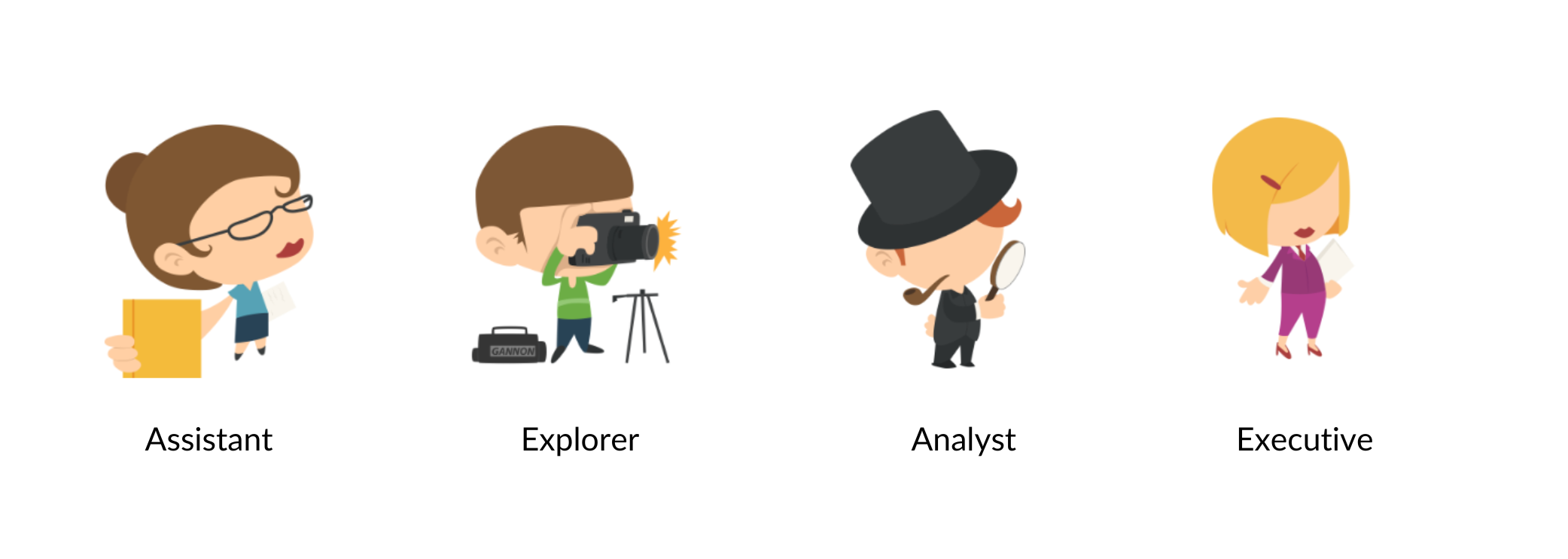

 ![Personas.png](https://books.pebbleroad.com/u/personas-7oHC2r.png) <p align="center">Search personas</p>

### Assistant
Just the answers.

Examples:
- Do I need a visa to enter Myanmar?
- How many pounds in a kilogram?
- What does this transaction code mean?

### Explorer
The breadth and depth of options.

Examples:
- Where do I advertise for Java developers?
- What are the restaurants near me?
- What are my employment benefits?

### Analyst
Making the right decision.

Examples:
- Does that company sell ‘fair-trade’ coffee?
- Which is the best phone to buy for Dad?
- How does the Nissan X-Trail compare with other cars in its class?

### Executive
Trends and insights.

Examples:
- How have sales fared since the apology for faulty software in our cars?
- How many cases were opened this year, and how many were closed?
- Which areas in Singapore have the highest yield for office rentals?

These personas offer a lens through which you can better understand user needs and behaviours. But first, you must invest time and effort to study your users.

Meeting your users to learn first-hand what they do and why, how they work and the bottlenecks they face will open your mind to ideas that will help design effective search experiences.

After your study, you should be able to answer two crucial questions:

1. Is there a dominant search persona at play?
2. What are the top search tasks?

A dominant persona emerges when many users exhibit behaviours similar to one of the four personas we described earlier. For example, if you find many users trying to get overviews and trends, you see signs of an 'Executive' persona.

Knowing the dominant persona will help surface the right ideas. Continuing with the 'Executive', they favour dashboards and charts over documents and links.

After you’ve identified the search personas (both dominant and minor), you need to define the top search tasks for each. 

A** top search task** is a task that matters a lot to many users. For example, the dominant persona on a bank’s self-support website will typically be an ‘Assistant’—find quick answers. A top search task may be to find the location of the bank’s branches and their operating hours.

A search task embodies a job a user is trying to get done. Searching is not the goal but a means to accomplish a job. The person looking for the ‘GDP of Cambodia’ will perhaps use the data in a slide deck pitched at investors. The job-to-be-done is to get investment, not download the GDP data. Similarly, the job-to-be-done for the person looking at the bank’s operating hours is perhaps to pay for an overseas purchase, not to find the ‘contact us’ page. Knowing the job-to-be-done will help in designing effective search experiences.

Incidentally, the Job-to-be-done, or JTBD for short, is a popular marketing and product development strategy championed by Clayton Christensen, an acclaimed professor at Harvard Business School.

Interviewing users, especially along their decision-making journeys, often identifies the JTBD. The journey reveals the many jobs that users try to complete and how they choose among alternative solutions.

For example, a person looking for GDP data on Cambodia can get the information from several sources, such as journals, databases, or personal contacts. The choice of a particular source reveals the person's criteria for getting the job done. It could be the speed of finding and copying the information into a slide deck.

Once the the job-to-be-done is identified, you can write it down using the form: 

- When I…
- I want to…
- So that I can…

For example:

- When I want to pitch to investors
- I want to use data to convince them of market opportunities in Cambodia
- So that I can get financial investment for my project

You can also add some criteria of success, such as:

- Ease of finding the right data
- Ease of making changes to the data
- Ease of copying data to a slide deck

I would like to point out that a study of search persona and their search tasks expressed as JTBD statements will reveal many gaps in the quality of the available content. 

For example, a JTBD may suggest presenting a country’s GDP information as a graph on search result snippets. However, the content may be in data tables inside PDF documents. In this case, the right thing to do is to figure out an automatic way to extract the data table and build the graphs. Yes, this may be a lot of work to do, but creating a culture of designing compelling search experiences is essential.

Next up: designing search interfaces that cater to dominant personas and search tasks.

# 3. Interface
The interface is the most visible element of the search experience. Most people know what a search interface looks like, and more often than not, it's one interface in particular. The image comes to mind when anyone hears the word "search." We're talking, of course, about Google.

Google's dominance of web search is unquestionable. Their interface is a cultural symbol. The year Google launched—1998—will be included in a chart of humanity's evolution. Herein lies the problem for those working with enterprise search.

While Google’s interface is ideal for search performance over web content, it is suboptimal for search performance over enterprise content, which includes the organisation’s websites, intranets, and apps.

For example, if you run a property investment website that helps customers buy property and rent it out, how will you guide them to make the best investment choices? Would you show a Google-like listing of the 10 investment opportunities for a given area? Or would you show a map highlighting rental yield across the country, like the one below?
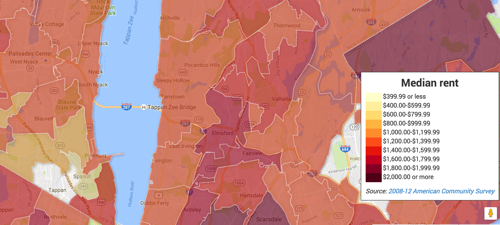

 ![search-rent.png](https://books.pebbleroad.com/u/search-rent-jHU5LT.png) Rental yield visualisation from richblockspoorblocks.com

If you notice, the rental yield search task belongs to an ‘Analyst’ persona. Google is weak in servicing such specific search personas. And justifiably so. The web is a big place with many types of users. Google has to cater to them all. It can’t be narrow. It has to offer comprehensive, generic results. If users have specific needs, they'll have to follow up outside Google.

However, you seldom face such Google-scale challenges in your organisation or department. You can cater to small and narrow collections. You can focus on meeting local needs. You can create custom interfaces for specific personas.

To be fair to Google, they rapidly enhance their search results alongside their 10 blue links. For example, a search for ‘Barack Obama’ shows descriptive data alongside page results. Google can do this because it keeps track of a web of data called the ‘knowledge graph’, which it exploits for certain classes of queries.
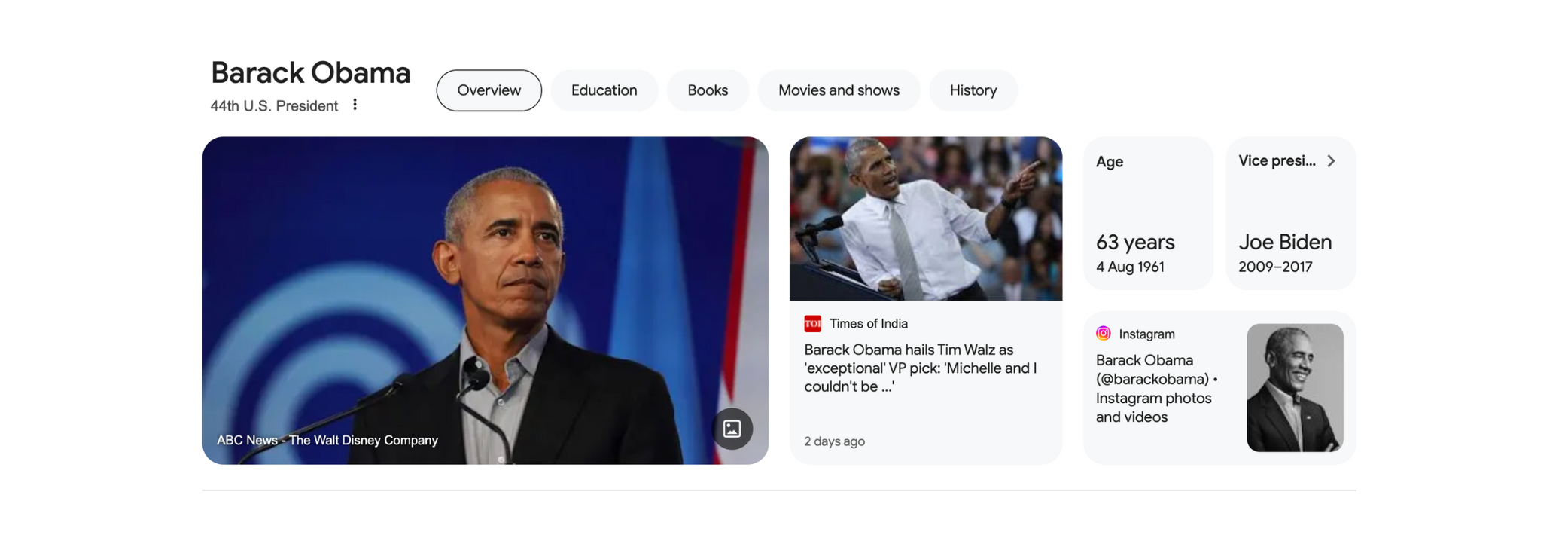

 ![Obama.png](https://books.pebbleroad.com/u/obama-WfKWwO.png) <p align="center"> Google’s knowledge graph showing data on Barack Obama</p>

If Google can perform this miracle by sieving through mind-boggling amounts of information, imagine what you can achieve with known use cases and information spanning a project, department, or organisation.

Search interfaces can have many features. The challenge is to select the ones that help in meeting user needs. Max Wilson, author of <a href="https://www.amazon.sg/Search-User-Interface-Design-Max-Wilson/dp/1608456897" target="blank">_Search User Interface Design_</a>, offers a taxonomy of search interface features:

- **Input**: Features that allow the searcher to express what they are looking for (e.g., search bar)
- **Control**: Features that help searchers to modify, refine, restrict or expand their Input (e.g., filters)
- **Informational**: Features that provide results or information about results (e.g., snippets)
- **Personalisable**: Features that relate specifically to searchers and their past interactions (e.g., bookmarks)

Let’s use this taxonomy to look at modern search interfaces and how they might work in an enterprise setting.

## Input
The search bar is the most recognisable input feature. It’s where users express their intent through a search query. However, this query is not a command but more like a conversation. The user gets some suggestions for their query. Based on the suggestions, the user may choose to modify the query. The process repeats until a negotiated query emerges. The eventual outcome, therefore, depends on the quality of the suggestions. 

You can leverage many opportunities to offer quality suggestions in an enterprise setting. For example, you can use:

- The user’s profile information, such as role and department
- Queries that the user previously used
- Queries that others in the project group, department or division have used
- Queries that match controlled terms in an enterprise taxonomy

For example, consider an organisation renting office spaces to industrial and commercial clients. When a staff member enters the term “early termination” to analyse precedents or policies relating to early termination of a lease, the query suggestions can be ranked based on the staff member’s department—industrial or commercial—thereby increasing the relevancy to the job at hand.

Imagine if all search interfaces in the enterprise leveraged local knowledge to offer relevant query suggestions -  what a boost in productivity such a design could achieve.

The search bar is no longer the only way to express a query. Devices like Amazon’s Echo and Google’s Assistant show you can use voice or text messages to start a search conversation. New AI-enabled search experiences like Perplexity offer multimodal input capabilities using text, documents, pictures and sound. It is only a matter of time before employees start demanding such experiences in their organisations. As with the search bar, the success of such technologies will depend on how well they address local, specific queries.

## Control
Faceted navigation is the most popular search control feature, especially for structured collections. The technique uses attributes or dimensions of content, known as facets, to narrow the set of results.

For example, you might be looking for a mobile phone, in which case Amazon shows you the entire catalogue. But then you spot a dimension or facet called “Item weight” and suddenly realise it is a feature you want in the phone. Clicking on the link shows only the phones with expandable memory, bringing you closer to your job-to-be-done.
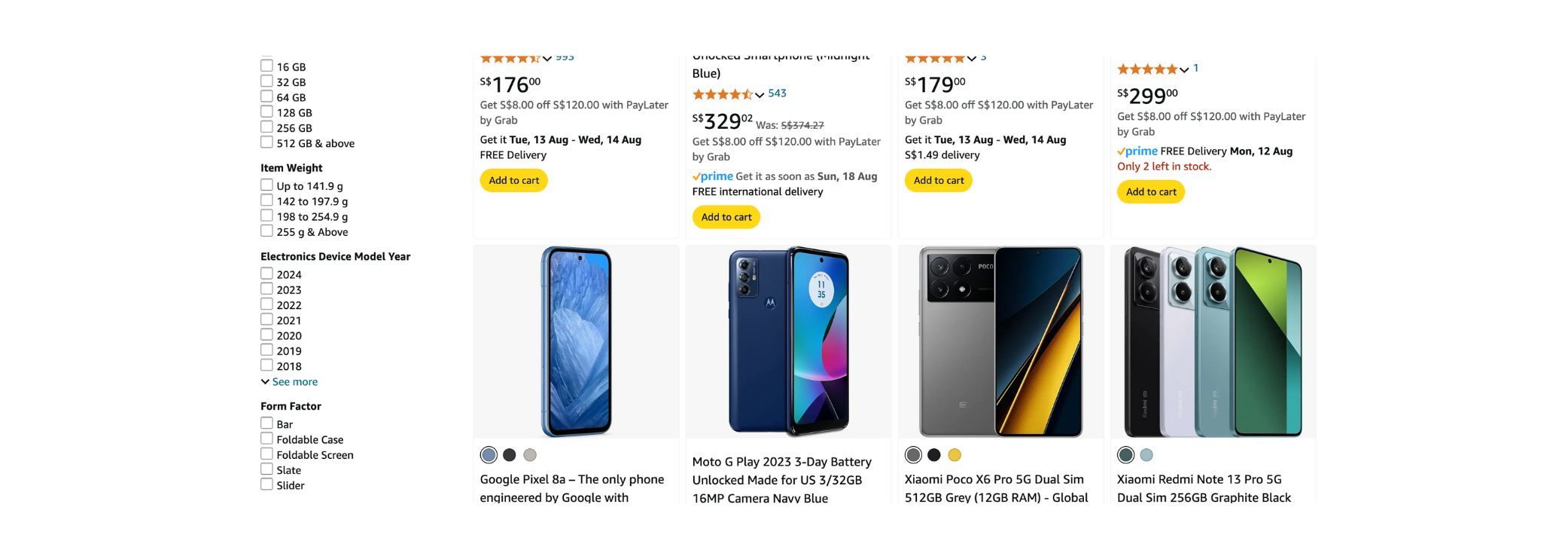

 ![Amazon.png](https://books.pebbleroad.com/u/amazon-BJDaGc.png) <p align="center">Amazon’s faceted interface</p>

A faceted navigation interface continues the conversation that started with query suggestions. It presents additional terms related to the query and nudges users to make appropriate choices.

As you would expect, the closer the terms are to the job-to-be-done, the higher their relevance. This suggests that faceted navigation cannot be a generic, one-size-fits-all offering. It has to be pertinent to the collection it serves. Enter metadata.

Jeffrey Pomerantz, author of <a href="https://www.amazon.sg/Metadata-Jeffrey-Pomerantz/dp/0262528517/" target="blank">_Metadata_</a>, describes metadata as “a statement about a potentially informative object”. ‘Item weight’ is a statement about a phone—a potentially informative object to the user. A faceted navigation interface arranges and displays such statements, hoping to release the potential relevancy of the collection to the user.

We will discuss metadata in another chapter. But for now, if you use local search and gather the correct metadata on a collection-by-collection basis, you can offer high-performing, faceted navigation interfaces across the organisation.

## Informational
There are many informational components out there. We will focus on two that are useful in an enterprise context:

1. Results snippets
2. Answer snippets

### Result snippets
Only three items were shown on a search results snippet for a long time: the resource's title, description, and URL. But this practice is ending, and thankfully so. The argument for its demise is simple:**every search result snippet should have the opportunity to ‘market’ its relevance to the user.**

For example, how can a snippet for a bank’s branch office market its relevance to the user? Well, it can show the location, opening hours, if the branch is currently open, and perhaps the ability to reserve a place in the queue. Such a snippet is called a **rich results snippet**.
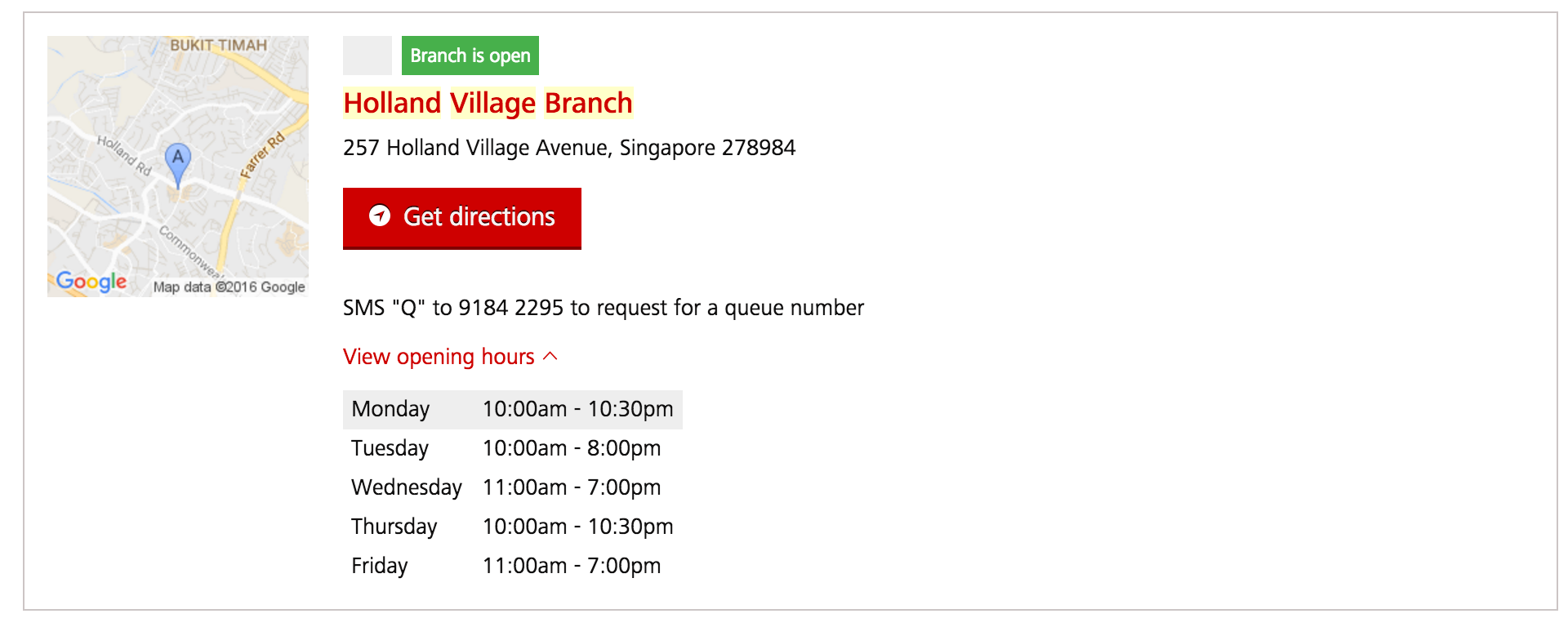

 ![serach-practice4.png](https://books.pebbleroad.com/u/serach-practice4-I7MdUF.png) <p align="center">A bank’s rich snippet for branch offices</p>

Going by the above argument, each content type or collection can have a unique rich snippet designed to market its relevance. 

Imagine how effective a search could be if content types such as budget papers, proposals, invoices, cases, project docs, etc., used rich information to market their relevance. Imagine if data tables marketed their relevance not as Excel downloads but as charts showing pertinent information.

### Answer snippets
Answer snippets respond to direct, factual queries such as “Who is Barack Obama?” or “What is the capital of India?” They appear above the search results list and cater to the ‘Assistant’ persona, who demands fast, direct answers.
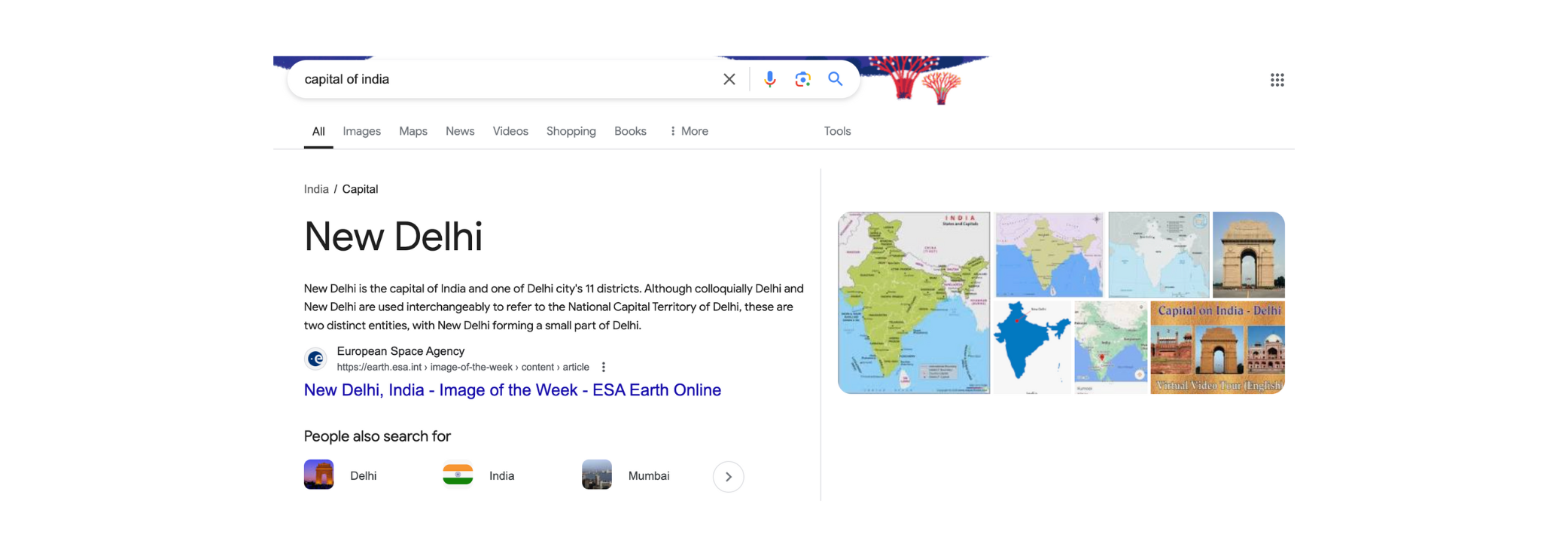

 ![Delhi.png](https://books.pebbleroad.com/u/delhi-Ezma4p.png) <p align="center">Answer snippet</p>

Google’s answer snippets, called 'Rich Answers', use its vast knowledge graph to suggest answers. You could use a similar tactic in the enterprise. The first step is to understand what answers users want. Then, you need a systematic way of collecting and integrating these answers with the search index. With such a system, your users can start seeing answers to questions like:

- Who is John Paul? (results from the staff directory)
- Who is on leave today? (results from the HR system)
- What projects are underway? (results from the project management system)

Many users want quick facts and answers, so Google’s Rich Answers appear on more than 25% of the queries. A similar situation can be argued to exist in enterprise settings. Therefore, offering rich snippets and answers is an efficient way to raise productivity and satisfaction levels by instantly responding to such requests.

One can imagine how rich snippets will fare with GenAI in the mix. The AI can figure out the best multi-modal snippet for the result and generate it on the fly.

## Personalisable
Personalisable features amplify the search experience for returning users.

Three common features that cater to repeat use are:

1. **Bookmarks**: Users can retrieve frequently used results from a single place.
2. **Search history**: Let users refer to or revisit previous queries.
3. **Recommendations**: Entice users to explore related resources they might not otherwise attempt. The recommendations are based on the user's browsing or interaction patterns.

Personalisable features can boost productivity and satisfaction levels in the enterprise. Yes, they require some plumbing to get right, but they are worth every effort.

There are many interface components and many ways to design them. Peter Morville’s Search Patterns and Marti Hearst’s Search User Interfaces are a testament to the breadth and depth of this challenge. The key takeaway is that there is no such thing as a default or out-of-the-box search interface. Every aspect of the interface must be designed to meet specific user needs.

# 4. Content
If the search interface is the most visible and familiar element of the search experience, then the quality of the indexed content is the most overlooked. Good quality content is critical for creating amazing search experiences. The challenge is first being aware of the correlation.

Search still has a ‘magic box’ appeal to many in the enterprise. They feel that search should work with any content. Again, they cite Google as an example. Little do they know that web publishers these days work hard to create good quality, web-friendly content so that it can rank high in Google search results.

For example, Google rewards pages that follow good HTML markup practices, such as using the \<title\> and \<h1\> tags for structure and those that use <a href="https://schema.org/" target="blank">schema.org</a> for marking up data in the pages such as \<Place\> and \<PostalAddress\> for describing locations. There are over 800 types listed on schema.org, and new ones are regularly added.

Comparatively, in the enterprise, much of the content is messy. Structure and markup are nonexistent, and content is hidden away in PDF and Word documents. Users looking for ‘revenue projections for 2022’ may see an ‘Annual Report’ PDF file suggested, not because the search algorithm has gone bonkers, but because the PDF document contains a table listing the year’s revenue projection figures. But is that the correct document from which to get such data? Does it pass the [CRAAP](https://guides.lib.uchicago.edu/c.php?g=1241077&p=9082343) (Currency, Relevance, Authority, Accuracy, and Purpose) test? 

A chart with an accompanying data table is a much better way of responding to the query on revenue projections. But you must draw the data from the PDF or connect directly to the financial system housing the data. You would go through this trouble if getting revenue projections was a **designated top task**—vital information that many people in the organisation need. You would ensure that the content correctly represents such tasks.

The process of optimising content to meet search tasks is sometimes referred to as **content modelling**. It involves cleaning and enriching the content.

You can think of content as a table of rows and columns. Each row is a resource. It could be a single document, such as the Annual Report, or a piece of information, such as the Revenue Projections 2022. The columns are metadata or dimensions such as Publish date or Financial year. The entire table is called a dataset or collection.

Your datasets can be metadata-rich or metadata-poor based on your top search requirements. If, for example, a document does not have Publish Date metadata, then it isn't easy to know whether it is the most recent. 

But you say that the date the document was published is mentioned in the body of the document. Why can't we pick that up and add it under the Publish Date?

Yes, that can be done. It is a process called **data enrichment**— extracting stuff from the body and using it as metadata. All this new metadata is then added to the search index to meet the demands of the search tasks.

 ![Enriching content.png](https://books.pebbleroad.com/u/enriching-content-BnoQQO.png) <p align="center">Content enrichment pipeline</p>

With the advancement of machine learning, it is now possible to extract names, places, dates and times from unstructured text. One can even create and assess the sentiment of the text. The discipline of **text analytics** is now a deep and mature practice.

## Worked example
Let’s say we have a news collection (shown below). Now, let’s also assume we researched and found that users are looking for specific things, like TV shows, celebrities and companies. The source format is too flat to answer such queries, so we need to enrich it.

| Metadata   | Value                                                                                                                                                                                                                                                                                                                                                                                            |
|------------|--------------------------------------------------------------------------------------------------------------------------------------------------------------------------------------------------------------------------------------------------------------------------------------------------------------------------------------------------------------------------------------------------|
| Id         | 03597bc6-d4fa-43c2-89e0-31fa0fab3997                                                                                                                                                                                                                                                                                                                                                             |
| Title      | ‘Late Show with Stephen Colbert’: When it debuts, and why we (and Stephen) can't wait                                                                                                                                                                                                                                                                                                            |
| Content    | Tuesday night brings the long-awaited debut of \"The Late Show with Stephen Colbert,\" as the host drops his \"Colbert Report\" persona, and welcomes his first guests, George Clooney and Jeb Bush, and musical director Jon… \r \nThe debut of \"The Late Show with Stephen Colbert\" finally arrives Tuesday night, after what seems like an eternity of Colbert teasing us with clips…<snip> |
| Source     | MyInforms                                                                                                                                                                                                                                                                                                                                                                                        |
| Published  | 2015-09-07T18:38:23Z                                                                                                                                                                                                                                                                                                                                                                             |
| Media type | News                                                                                                                                                                                                                                                                                                                                                                                             |


Based on the requirements, we create new columns using text analytics (shown below). 

| Metadata           | Value                                                                                                                                                                                                                                                                                                                                                                                            |
|--------------------|--------------------------------------------------------------------------------------------------------------------------------------------------------------------------------------------------------------------------------------------------------------------------------------------------------------------------------------------------------------------------------------------------|
| Id                 | 03597bc6-d4fa-43c2-89e0-31fa0fab3997                                                                                                                                                                                                                                                                                                                                                             |
| Title              | ‘Late Show with Stephen Colbert’: When it debuts, and why we (and Stephen) can't wait                                                                                                                                                                                                                                                                                                            |
| Content            | Tuesday night brings the long-awaited debut of \"The Late Show with Stephen Colbert,\" as the host drops his \"Colbert Report\" persona, and welcomes his first guests, George Clooney and Jeb Bush, and musical director Jon… \r \nThe debut of \"The Late Show with Stephen Colbert\" finally arrives Tuesday night, after what seems like an eternity of Colbert teasing us with clips…<snip> |
| Source             | MyInforms                                                                                                                                                                                                                                                                                                                                                                                        |
| Published          | 2015-09-07T18:38:23Z                                                                                                                                                                                                                                                                                                                                                                             |
| Media type         | News                                                                                                                                                                                                                                                                                                                                                                                             |
| People             | Stephen Colbert<br>George Clooney<br>Jeb Bush<br>Marshall Mathers<br>David Letterman<br>Stephen Sondheim<br>Beverly Hilton                                                                                                                                                                                                                                                                       |
| State              | Michigan                                                                                                                                                                                                                                                                                                                                                                                         |
| Television Show    | The Late Show                                                                                                                                                                                                                                                                                                                                                                                    |
| Television Company | CBS                                                                                                                                                                                                                                                                                                                                                                                              |
| Facility           | Beverly Hilton hotel ballroom                                                                                                                                                                                                                                                                                                                                                                    |
| Organisation       | Television Critics Association                                                                                                                                                                                                                                                                                                                                                                   |


As you can see, search now has many hooks it can leverage to answer specific queries. The enrichments help improve search relevancy and satisfaction.

Search is as good as the quality of the available content. If the content is messy, search can’t magically make sense of it. You need to model the content to meet specific needs. The repertoire of methods explained in this article offers an opportunity to design amazingly effective search experiences.

# 5. Context
The 1981 edition of the Guinness Book of World Records carried an entry of the “shortest literary correspondence on record”:
> The shortest literary correspondence on record was that between Victor Marie Hugo (l802-85) and his publisher, Hurst and Blackett, in l862. The author was on holiday and anxious to know how his new novel Les Misérables was selling. He wrote “?”. The reply was ‘!’.

There is doubt as to whether the story is true, but if it ever did happen, it is an excellent example of context at play. Only those two people knew what was going on. In this case, context is all of the unsaid that influenced all of the said.

Context is the information one uses to understand a situation. When context is missing or wrong, we say that the understanding is “out of context.” But when it is present, everything speeds up, becomes simpler, and even enjoyable, like the claimed correspondence between Victor Hugo and his publisher.

Bringing context to search, we can say that context offers the **situational signals we can use to design rich search experiences**.

Let’s consider three search scenarios:

1. A bank customer having problems withdrawing money when overseas
1. An employee enquiring about paid paternity leave
1. A new employee looking for minutes of meeting template

## A bank customer having problems withdrawing money when overseas
**The situation**: A bank customer travels overseas on a business trip. He goes to an ATM but can’t seem to withdraw cash. He goes to the bank’s website and enters “can't withdraw money from ATM” into the search box.

**The challenge**: How might we lower the customer’s anxiety and help resolve the matter quickly?

**Available contextual signals**: We know that the customer is overseas (location). Also, because the customer uses a mobile device, we can gather the time of the day (time) and his GPS coordinates (location).

For starters, if we have a page about problems withdrawing money from overseas ATMs, we should boost the relevancy factor of this page against the query. Next, if we have a list of bank branches, we can offer customers a way to resolve the issue by visiting the nearest branch. We can use the ‘time’ information first to check whether the branch office is open.

 ![context1.png](https://books.pebbleroad.com/u/context1-nRtcv9.png) Results of the query “can't withdraw money from ATM”.

## An employee enquiring about paid paternity leave
**The situation**: It is a happy time for this employee. His wife is due to deliver in a few months, and he wants to plan his paternity leave. He types in “paid paternity leave” into the search box.

**The challenge**: How might we help this employee quickly understand and apply for paternity leave (he already has a lot on his mind)?

**Available contextual signals**: We know the person's ID as he is logged into the intranet. We also know his rank and his entitlements. The beauty of search in the enterprise is that you can leverage a lot of such data. You can access HR, financial, sales, and marketing systems and bring all of this data to bear to improve search relevancy. For the query on paternity leave, you can directly access the eligibility and entitlements to offer a simple answer like the one shown below.

 ![context2.png](https://books.pebbleroad.com/u/context2-tNawb2.png) 
Results to the query “paid paternity leave”.

## A new employee looking for minutes of meeting template

**The situation**: A new employee has joined the project team. Eager to be valuable and helpful, she wants to attend a few meetings and offers to take notes. She types the ‘minutes of meeting template’ into the search box.

**The challenge:** How might we help this employee learn the ropes faster without overwhelming her with a chaotic information environment?

**Available contextual signals**: Similar to the paternity leave scenario, we know something about this employee. We know that she is new. We also know she belongs to a particular project team. We can bring this and other details to bear on the search results and offer more relevant information, as shown below.

 ![context3.png](https://books.pebbleroad.com/u/context3-PGoHSy.png) Results to the query “minutes of meeting template”.

## Contextual signals
So, we've established that contextual signals are useful for search. But how many types are there, and how do we think about them?

Cennydd Bowles, a digital product designer who previously worked with Twitter, offers [a list of contextual signals he calls DETAILS](http://www.cennydd.com/writing/designing-with-context):

- **Device**: Using the native contextual signals that the device offers (e.g., it can take pictures)
- **Environment**: Using the signals in the environment (e.g., quiet or noisy)
- **Time**: Using temporal signals (e.g., time of a meeting)
- **Activity**: Using signals from a task (e.g., when creating a policy report)
- **Individual**: Using personal signals (e.g., the type of work)
- **Location**: Using signals of space and time (e.g., office locations)Social: Using social signals (e.g., popular items)

These seven types of contextual signals cover most cases and can be used when designing search experiences.

## General relevancy, personalisation and recommendations
The three scenarios we covered earlier are three different ways to use contextual information:

| Scenario                                                         | Type of use                    |
|------------------------------------------------------------------|--------------------------------|
| A bank customer having problems withdrawing money when overseas. | Improve general relevancy      |
| An employee enquiring about paid paternity leave.                | Offer personalised results     |
| A new employee looking for minutes of meeting template.          | Recommend relevant information |

### Improve general relevancy
You can use contextual signals to boost specific relevancy parameters. The common signals are device, time and location. Improving general relevancy is easy to include and implement.

### Offer personalised results
You can use the properties of the searcher to offer targeted search results (individual and social signals). Getting personalised results means tapping into personal data, usually locked away in dedicated systems. Thus, you may be looking at some level of system integration to get personalisation going.

### Recommend relevant information
Recommendations go far beyond the simple type shown in the scenario. They can scale to the ones offered by Amazon, Netflix and Pandora. The recommender systems powering such sites use all sorts of contextual signals, their weights, and sophisticated mathematics to provide relevant recommendations. But the good news is that not all situations call for such powerhouse treatment. We can start with simple but useful recommendations.

Context dramatically improves the search experience. It raises productivity and is enjoyable to consume when done right. With so much going for it, why haven’t organisations included context in their designs? The answer, which applies to much of enterprise search, is that organisations assume that context is automatic and all they have to do is to buy the right 'search tech'. As we have seen in this chapter, that is not the case - you need to design for context.


# 6. Technology
If the interface is the most visible element of the search experience, then the search technology (search tech for short) is the most misunderstood. It is the search tech, along with content—the other overlooked element—that most influences the quality of the search experience. 

For example, an important job of search tech is to infer the meaning of a query. So if a user searches for ‘tenders’, then the tech and some human assistance should be able to infer that tenders, tenders, notices, quotations, quotes, project invitations, etc., refer to the same thing. And since the query is a single term without qualifiers, perhaps the user is looking for a page listing all the tenders (a topic page of sorts). A good search tech can easily offer such experiences.

Business and IT people misunderstand search tech for a couple of reasons. First, they believe that search is a utility item—you switch it on and forget about it. Second, they think that the search engine is the search tech. They are surprised to hear that the search tech is a stack of technologies that, besides a search engine, may include text analytics, taxonomies, search analytics, visualisation and much more.

Don't blame the business and IT people for making such assumptions; blame the search tech vendors. They took advantage of the organisation's lack of search knowledge to peddle their products, promised Google-like search performance out of the box, and built a great wall of search ignorance that has withstood the march of understanding for a long time.

The good news is that the wall is showing signs of crumbling. The deluge of big data and the need to tame it has again put search tech in the limelight. Emerging technologies like machine learning and GenAI are forcing business and IT people to reassess how they design, implement and manage search tech.

Let’s now look at some critical components of the search tech stack.

## Taxonomies
Taxonomies and associated vocabularies such as thesauri and dictionaries provide the semantic structure to make sense of content. These are created by humans and exploited by machines to offer relevant results to users. For example, the text of an article on football does not reveal much about the sport. But the taxonomy of sport can add that ‘football’ and ‘soccer’ mean the same thing (unless you are in the US, where football is an entirely different sport) and involves kicking a ball with the foot to score a goal.

For more information on taxonomies and other semantic concepts, check out our book on _<a href="https://books.pebbleroad.com/2/organising-digital-information-for-others" target="blank">Organising Digital Information</a>_.

## Text analytics
Text analytics has a powerful cluster of technologies to extract meaning and add structure to unstructured content. It uses rule sets and natural language computations to analyse the content, extract named entities, facts and summaries, and offer insights via clustering and sentiment analysis. It can also use taxonomies to auto-categorise content. For example, text analytics can check if a document is about football played in the US and then categorise it under ‘American football’. Tom Reamy’s book, <a href="http://a.co/5F8wWT4" target="blank">_Deep Text_</a>, offers an easy introduction to text analytics.

## Search engine
The search engine uses a ranking algorithm to surface the most relevant documents. In the simplest form, when a search is executed, the user’s query is compared against all the documents in the collection, and each document is given a score for how well it matches the query. The documents are sorted using this score, and the top results are returned. 

The quality of the search results is highly correlated to the quality of the content. For example, you can index 100,000 documents without enhancements and offer ordinary search experiences. However, you can also pass the collection through taxonomies and text analytics and deliver relevant, specific, extraordinary search experiences.

## Search analytics
Search analytics measures how the search is performing. It collects terms people use, results they view and actions they take. It also finds terms that get zero results or a low number of results. The benefit of analysing search performance is that tweaks can be made to close any gaps. This way, search analytics and relevancy tuning go hand-in-hand. For example,  if search analytics finds that people searching for ‘hotline’ are getting zero results, adding it as a synonym for ‘contact’ (tuning) can solve the issue. 

A key benefit of search analytics is that it can provide feedback to taxonomies and text analytics configurations. For example, the word "hotline" can be offered as a synonym for the taxonomy system so that it is also in sync with ground realities.

## An example
Consider a collection of news articles. The users of this collection are policymakers who need to keep track of events and agreements between countries. One of their top queries is to study meetings between political leaders. Knowing this background, how can we create a search experience that helps users get their job done in a simple, helpful way?

Consider a sample query: _obama meets indian pm_

What would a vanilla search engine deliver? It would show top-ranked articles for the keywords in the query. But that isn’t very helpful to our policymakers. Consider this alternative.

 ![Search stack.png](https://books.pebbleroad.com/u/search-stack-VknlAk.png) 
 <p align="center">Search results for the query: “obama meets indian pm”</p>

In the screenshot above, the user gets the profile pictures of the two leaders with their full names. The search results use these names to query the collection and, therefore, get more relevant results. The filters on the left offer the user semantic handles to refine the query. How is all of this done?

Here are the steps that the search tech takes:

1. Processes the query to identify named entities such as people and places mentioned (text analytics).
1. Looks up the acronym 'pm' against a taxonomy to find its expanded form.
1. Identifies the entity 'indian pm' as a person and looks it up in the taxonomy, which returns 'Narendra Modi'.
1. Does the same for the person 'obama', which actually returns two results 'Barack Obama' and 'Michelle Obama' (the user is given the option to select the correct Obama).
1. Modifies the search query to include the names of the entities involved to return relevant results.
1. Looks up the entities 'Barack Obama' and 'Narendra Modi' in DBpedia to get their photos.
1. Creates filters based on the taxonomic terms they are tagged with.

Finally, search usage is analysed to check what queries are used and to refine where necessary.

Imagine if the search tech could work magic for each top intent in your team, department and organisation. People will be more efficient in their jobs and more happy in their lives.

## AI-powered search stack
With large language models (LLMs) and GenAI all the rage these days, how does this impact the search stack?

LLMs are trained on the internet, not on enterprise content. We can't use vanilla LLMs to offer enterprise search.  We must add enterprise content with all its access rights and other requirements to the LLM. That is what Retrieval-augmented generation (RAG) offers. RAG methods use all the benefits of LLMs and GenAI but apply them to specific resources, such as enterprise content.

However, LLMs generate responses based on probabilities, which can sometimes lead to imprecise or irrelevant answers. They might "hallucinate" information that sounds plausible but is incorrect. A formal taxonomy helps in grounding the results.

High-quality enterprise content will give better RAG results. Therefore, though the LLMs and GenAI can play the taxonomy and text analytics roles themselves, having a formal taxonomy increases the accuracy and efficacy of the results.


# 7. Governance
Many, especially business executives, are surprised that enterprise search requires constant effort and maintenance to stay relevant. Just like critical organisations, search needs governance. Why? Because user needs change, business needs change, and content changes constantly.  Without governance, search performance will gradually decay. Search governance ensures that search remains relevant amid these changes.

Governance usually includes:
- Roles and responsibilities
- Policies, guidelines and procedures

## Roles and responsibilities
There are many roles to play in search governance, depending on the scale and importance of search in the organisation. These are roles, not full-time positions. Usually, one or two people can play many roles.

### Search manager
- Developing and delivering an enterprise search strategy to meet business objectives
- Overseeing and reporting on all search budgets
- Overseeing all search deployments and ensuring search standards are met
- Managing relationships between search technology providers and the organisation's IT team
- Overseeing and reporting on overall search performance

### Search analyst
- Gathering user requirements
- Gathering content requirements
- Defining search outcomes
- Reviewing search analytics
- Defining content improvements

### Search frontend engineer
- Developing search frontend interfaces
- Developing rich snippets
- Developing search visualisations
- Developing search dashboards

### Search backend engineer
- Acquiring, designing and building backend search technologies
- Configuring and integrating technologies for specific search projects
- Acquiring or building search connectors to content collections in different systems
- Designing and implementing access and security parameters
- Designing disaster management parameters

### Search relevancy engineer
- Analysing search logs to identify gaps
- Tuning search ranking parameters to improve relevancy
- Building interventions to improve search relevancy

## Policies, guidelines and procedures
Policies are high-level compliance statements (e.g., records should have metadata). Guidelines describe good practices. Procedures show how to carry out key activities. 

Policies connote rigidity. If you are starting with enterprise search, you want fewer controls. It would help if you opted for a lightweight approach to governance rather than a heavyweight one. It is better to start with simple guidelines and procedures to start search thinking. For example, focus on key search tasks, analyse search logs every week, etc.

“Think big, start small, scale fast” is an approach that Tom Reamy, Chief Knowledge Architect at KAPS Group, advises to build corporate taxonomies. It seems the same method may apply to developing a search governance. Yes, you need to know the big picture and the assumptions that come with it. But it would be best to start small and scale fast so that you don't allow the sceptics to reject this new thinking on search.

# Conclusion
Thanks to LLMS and GenAI, there is renewed interest in enterprise search. But if history offers any lesson, it is that relying on a magic box always disappoints. We have decades of research and findings on how to make enterprise search work, and we must use them to create user-centric search experiences that delight users. Yes, LLMs and GenAI not only help in fixing search but offer a whole new set of experiences.  

Let me describe a proof of concept (POC) we did for a banking client five years ago when we had the old machine learning models. We built a search app to answer queries on credit card usage in SE Asia. Here's a use case of the app:

- A bank executive sees a QR code on a TV in his room. 
- He scans the QR code with his mobile phone. The screen on the mobile phone reveals a Siri-like voice interface.
- Executive: "What is the credit card usage for this month in Myanmar?"
- The app shows a graph of credit card usage across the last six months.
- Executive: "Compare this to the numbers in Vietnam."
- The graph now responds to show two line charts.
- Executive: "Zoom in to the May-Jun period."
- The graph is updated to reflect the May-Jun numbers.
- Executive: "OK, send a picture of this to my email."
- The screen on the app says: Picture captured and sent to your email".

Yes, the POC could only understand a small set of commands, and it could not reply in voice, but you can imagine the kinds of experiences we can build with today's LLMs and GenAI capabilities. 

We hope that the material in this book helps you to build search experiences that delight users. It is high time!

# Acknowledgements
The first draft of this book was made many years ago when PebbleRoad spun off a company specialising in enterprise search. The company did not take off - people told us it was too early in the game - but the knowledge remained.  Now that LLMs and GenAI are boosting enterprise search,  we decided to publish it again and update it to reflect the AI trends.

I want to thank <a href="https://www.linkedin.com/in/plambe/" target="blank">Patrick Lambe</a> and <a href="https://www.linkedin.com/in/martin-white-a7395/" target="blank">Martin White</a> for their help and support in vetting the earlier drafts of this book.